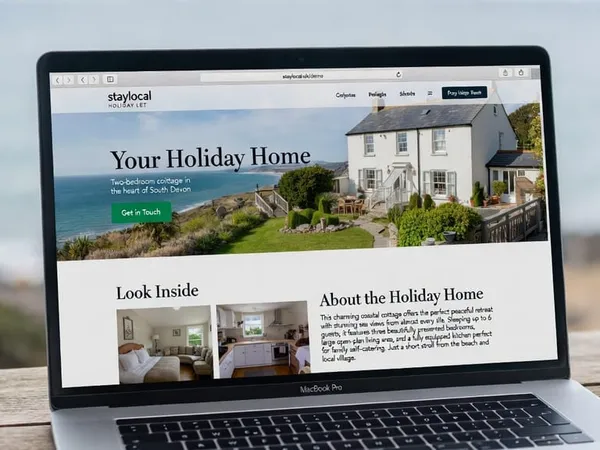

You have escaped the platforms. Your own website is live, enquiries are landing in your inbox, and guests are excited to book direct. Then comes the question every owner eventually asks: how do I actually take the money?
Most owners start with bank transfer. It feels simple. It is also slower, more awkward, and more prone to going wrong than almost any other part of running a direct-booking holiday home.
This guide walks through the real options for taking payments direct, including the deposit-and-balance model most successful owners settle on, what a modern checkout actually looks like, and how to set one up without becoming a payments expert.
Why Bank Transfer Is the Default (and the Problem)
When you take a booking off-platform, bank transfer is usually the first thing that comes to mind. No fees, no middleman, money straight into your account. For a single booking from a friend of a friend, it works fine.
The cracks show once you are doing this regularly:
- You become the chaser. Guests forget, get distracted, or simply do not transfer the deposit until you nudge them. Twice.
- There is no instant confirmation. You are checking your banking app, screenshotting references, and manually matching payments to enquiries in a spreadsheet or notebook.
- International guests struggle. A guest from overseas paying a UK bank account by transfer can hit delays, charges on their end, or simply give up and book somewhere else that takes a card.
- It looks less professional. Fairly or not, a guest who has just compared your site to Airbnb’s slick checkout notices the difference when you reply asking them to “BACS the deposit to sort code 12-34-56.”
None of this is fatal. Plenty of owners run successful direct-booking businesses on bank transfer alone. But it is friction, and friction at the exact moment a guest has decided to book is the worst place for it.
The Real Options for Taking Payments Direct
Bank transfer. Free, familiar, and fine for low volume. Best paired with a clear, friendly message that includes the exact reference to use, so payments are easy to match up.
Card payment via a payment processor (Stripe, SumUp, GoCardless, etc.). A guest enters their card details on your site and the money lands in your account, usually within a couple of business days. You pay a small percentage per transaction, typically 1.4–2.9% plus a small fixed fee, which is a fraction of the 15% a platform would have taken.
Payment links. Most processors let you generate a one-off link for an exact amount and email or text it to a guest. No website integration needed. Good for low-tech setups or as a fallback alongside an enquiry form.
PayPal. Widely trusted by guests, simple to set up, though fees are broadly similar to card processors and some guests find the PayPal checkout flow clunky on mobile.
Direct debit (GoCardless and similar). Useful for the final balance payment on a long booking, since it can be set up once and collected automatically closer to arrival, but it is a poor fit for a deposit a guest needs to pay instantly to secure dates.
For most UK holiday home owners, the winning combination is straightforward: card payment for the deposit, taken instantly through a processor like Stripe, with the balance collected closer to arrival by card, transfer, or direct debit, whichever suits the booking.
Deposit and Balance: The Model Almost Everyone Lands On
Asking a guest to pay the full amount months before arrival is a hard sell. Asking them to pay nothing until check-in leaves you exposed to cancellations. The deposit-and-balance model splits the difference and has become the standard across the industry for good reason.
A typical structure looks like this:
| Amount | When | |
|---|---|---|
| Deposit | 20–30% of total | At time of booking |
| Balance | Remaining 70–80% | 4–8 weeks before arrival |
A 25% deposit is the most common middle ground. It is enough to feel like a genuine commitment from the guest, without being so large that it creates hesitation at the exact moment you want them to click “Book.”
The deposit also does something quietly important: it converts an enquiry into a booking. A guest who has paid towards their stay is a guest who has, in their own mind, already committed. That single step removes most of the back-and-forth and “just checking other places” hesitation that drags out enquiries sent by email alone.
What a Direct Deposit Checkout Actually Looks Like
This is usually the point where owners assume taking card payments means complicated developer work, a merchant account, and weeks of setup. It does not. Modern processors like Stripe are built so a simple, secure checkout can sit directly on your own site, styled to match your property rather than looking like a generic payment form bolted on.
Picture a deposit checkout for a fictional cottage, showing the booking summary, the 25% deposit due today, and the remaining balance with its due date, all in one screen a guest can complete in under a minute.
Notice what is doing the work here. The guest sees exactly what they are paying and why, the deposit and balance are broken down with no ambiguity, and the whole thing carries the property’s own branding rather than handing the guest off to a third-party site. Critically, the money goes straight to the owner’s account. No platform sits between the guest and the booking taking a cut.
Setting This Up Without Becoming a Payments Expert
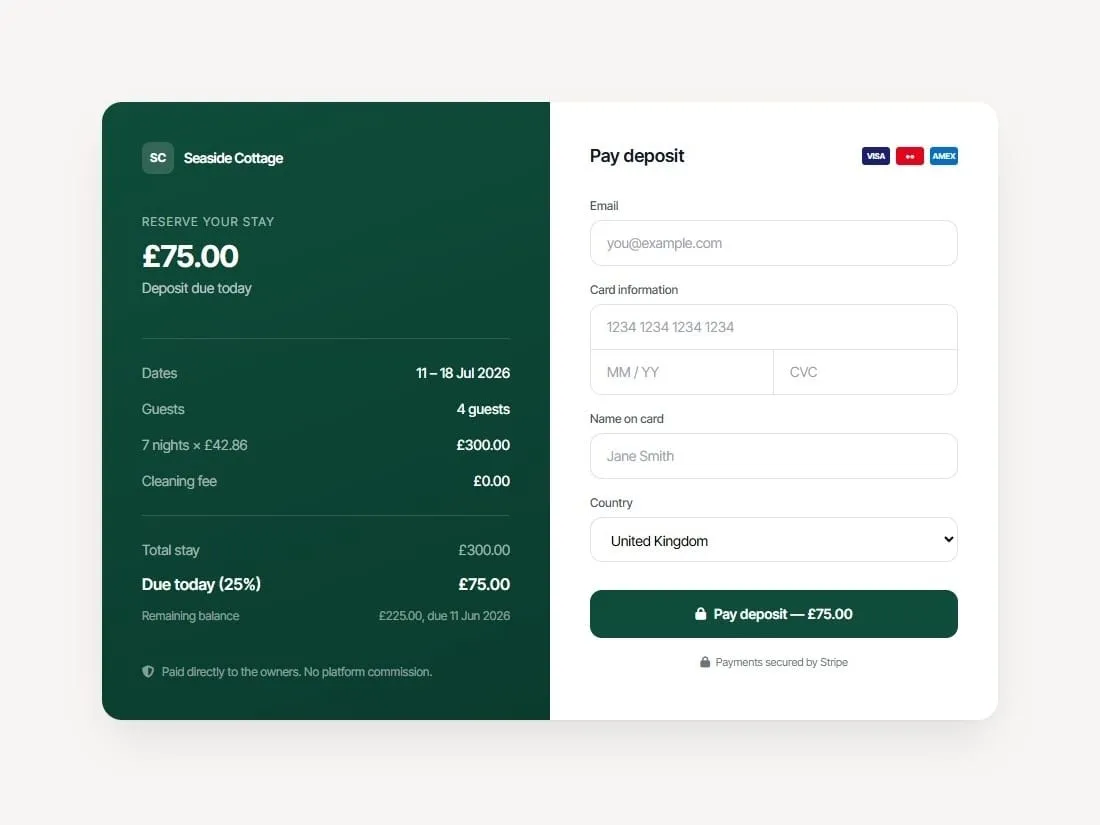
This is the kind of checkout Stripe, GoCardless, and most modern processors make genuinely achievable for a one-page holiday let site, usually for a setup that takes an afternoon rather than a sprint.
- Open a Stripe account. Free to set up, UK-based, and built specifically for this kind of card payment. You will need basic business details and a bank account for payouts.
- Decide your deposit percentage. 25% is the sensible default. Lower it for short stays where the total is already small, or raise it slightly for peak-season bookings where cancellations are costlier to you.
- Set a balance due date. Four to eight weeks before arrival is standard. Build this into your booking confirmation email so guests are never caught off guard.
- Add a checkout to your site, or use a payment link. If your site already has a booking enquiry form, a deposit checkout can sit right after it. If you want to start simpler, a one-off Stripe payment link sent by email achieves the same outcome with no integration work at all.
- Automate the reminder for the balance. Most processors can schedule a follow-up payment request automatically, so collecting the remaining 75% does not rely on you remembering to chase it.
- Keep a clear cancellation policy visible at checkout. Guests paying a deposit want to know exactly what happens if their plans change. State it plainly rather than burying it in terms and conditions.
What This Means for Your Bookings
Owners who move from “pay by bank transfer, whenever you get round to it” to a proper deposit checkout tend to notice the same two things. Enquiries convert to confirmed bookings faster, because the awkward gap between “I’d like to book” and “I have actually paid” disappears. And there are fewer no-shows and late cancellations, because a guest who has paid even a partial deposit treats the booking as real.
None of this requires a platform, a 15% cut, or losing control of your guest relationship. It requires a processor that costs a few percent per transaction, a clear deposit policy, and a checkout that looks like it belongs on your site rather than someone else’s.
The owners already running their own one-page sites and keeping every booking they take are usually one short afternoon away from adding this. The harder problem, getting found and getting the enquiry, you have likely already solved. Taking the payment should not be the part that lets the booking slip away.